

30
Premium Content
Microsoft Excel
5,000so'm
Betlar soni
11 taFayl hajmi
579.63 KBFayl turi
.pptxMahsulot tavsifi
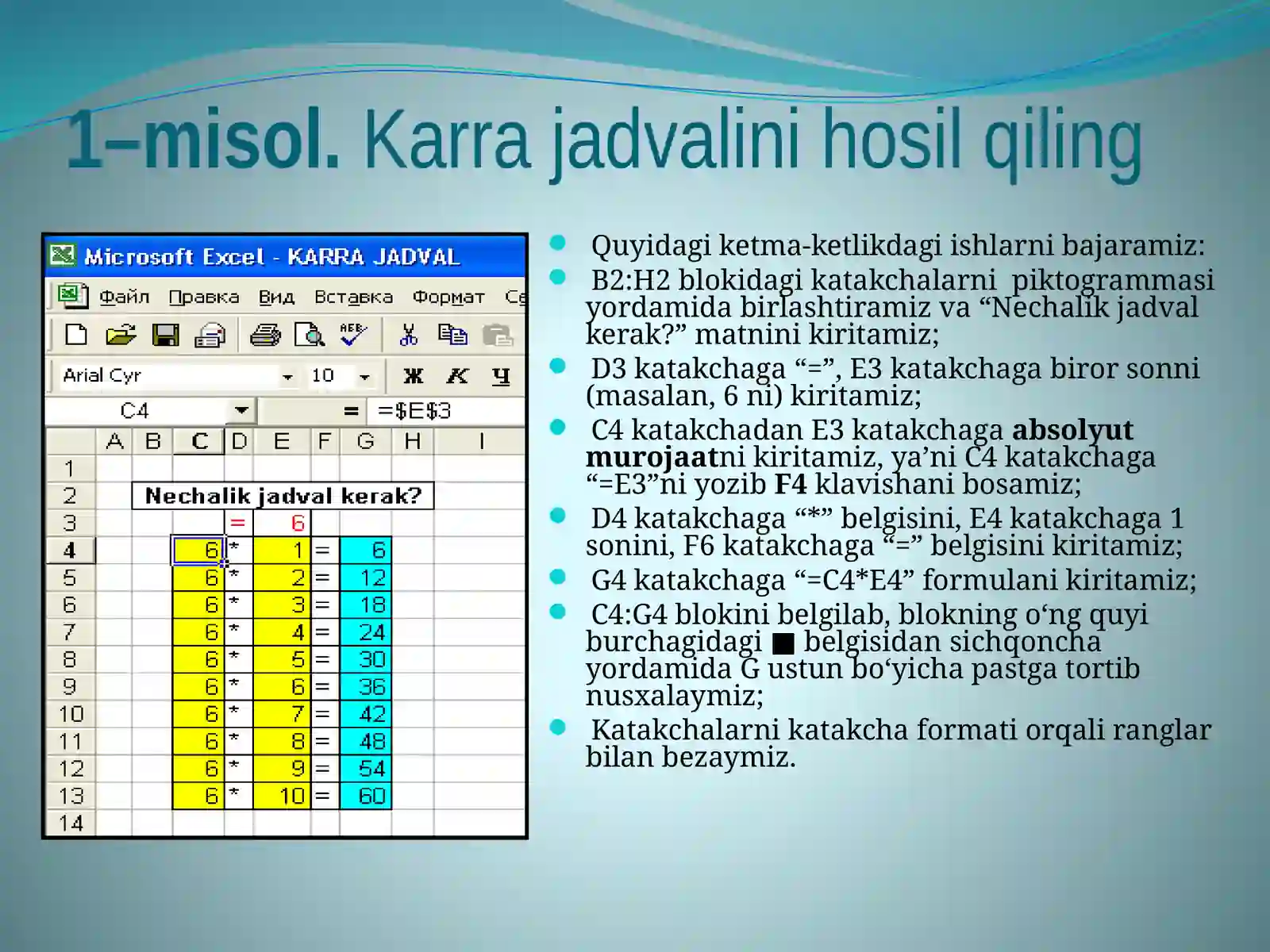
Working with text and formulas in the Microsoft Excel spreadsheet editor. Perform the following tasks in sequence: create a car table in cells B2:H2 with pictograms, enter the text "How many tables do you need?", enter a number (for example, 6) in cell E3, enter an absolute reference from cell C4 to E3 by entering "=E3" in cell C4, press the F4 key, enter the "*" symbol in cell D4, enter the number 1 in cell E4, enter the "=" symbol in cell F6, enter the formula "=C4*E4" in cell G4
Teglar
#excel#formulas#tables
Premium Content
Microsoft Excel
5,000so'm
Betlar soni
11 taFayl hajmi
579.63 KBFayl turi
.pptx
✓
Muallif
Maftuna Raxmatova
Tasdiqlangan sotuvchi
Jami mahsulotlar43 ta
Sotilgan0 ta